



 11 / 12

For More Information Visit
www.btechavmounts.comB-TECH
PROFESSIONAL
11
TM
Multi-ScreenMounts
AV
Trolleys &Stand
PremiumAV Stands
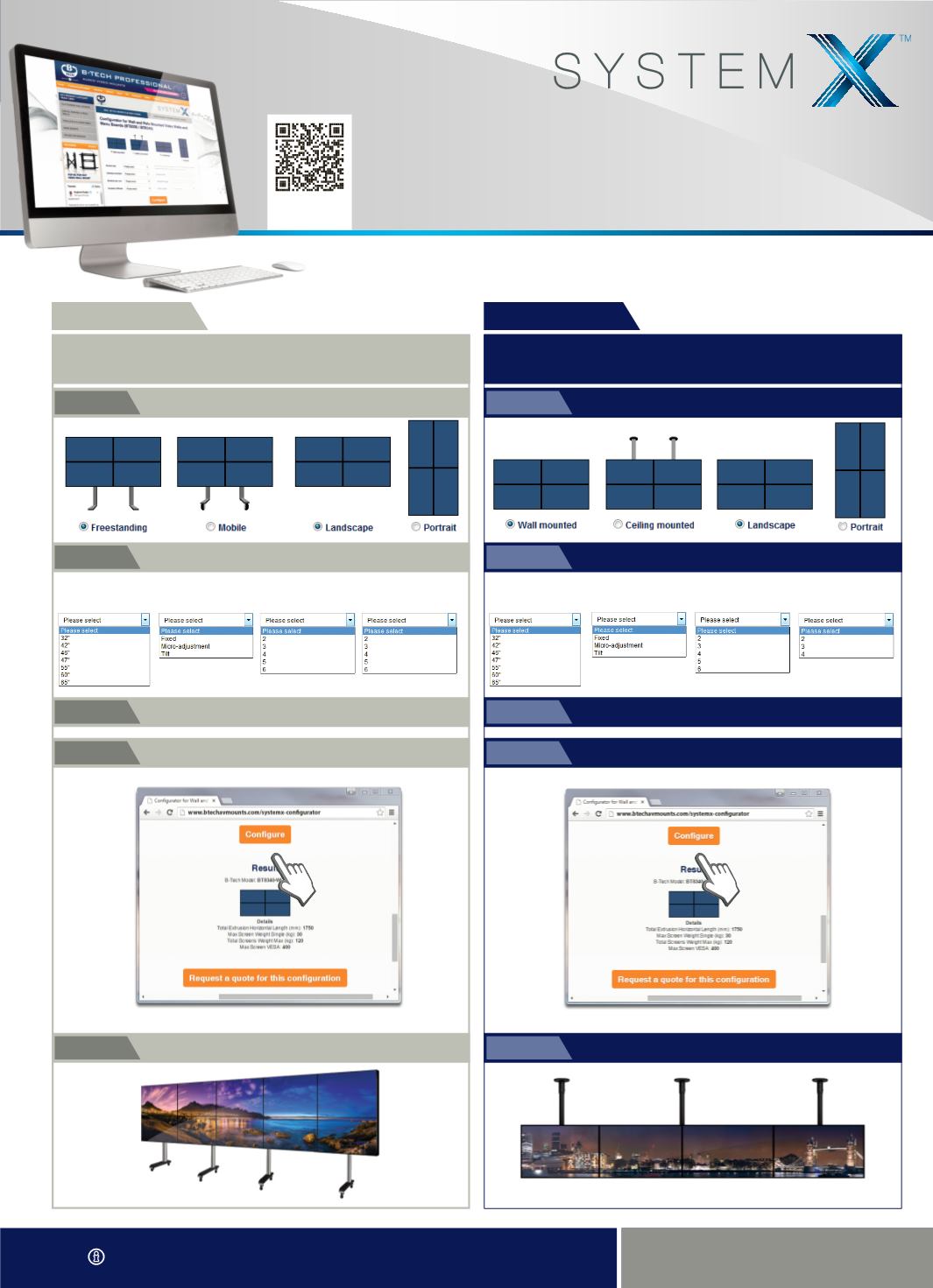
CONFIGURATION TOOL
www.btechavmounts.com/systemx-configuratorOur online configuration tool is designed to specify custom configurations. Select a
freestanding, mobile, wall or ceiling mounted setup and then choose screen size and quantity,
orientation, interface arm function as well as pole length/leg height (where applicable).
SCREEN SIZE
INTERFACE FUNCTION SCREENS PER ROW NUMBER OF ROWS
Select Freestanding or Mobile and preferred orientation
STEP:
1
Select from the drop down boxes to create a solution
that is ideal for you
STEP:
2
Select desired leg height
STEP:
3
Click the configure button to generate your solution and part code
STEP:
4
Request a quote and let us sort the rest!
STEP:
5
FREESTANDING
ANDMOBILEVIDEOWALL STANDS
SCREEN SIZE
INTERFACE FUNCTION SCREENS PER ROW NUMBER OF ROWS
Select from the drop down boxes to create a solution
that is ideal for you
STEP:
2
Select wall or ceiling mounted and preferred orientation
STEP:
1
Select desired pole length if creating a ceiling mounted solution
STEP:
3
Click the configure button to generate your solution and part code
STEP:
4
Request a quote and let us sort the rest!
STEP:
5
WALL AND POLE MOUNTED
VIDEOWALLS ANDMENU BOARDS
BT8330 & BT8340
BT8370 & BT8371
Scan here
to view